Your voice, typed everywhere.
PromptStream is system-wide dictation for macOS and Linux. Hold a key, speak, release — about a second later your words land wherever your cursor is, already cleaned up. Speaking is 3–4× faster than typing.
Everything in one quiet window.
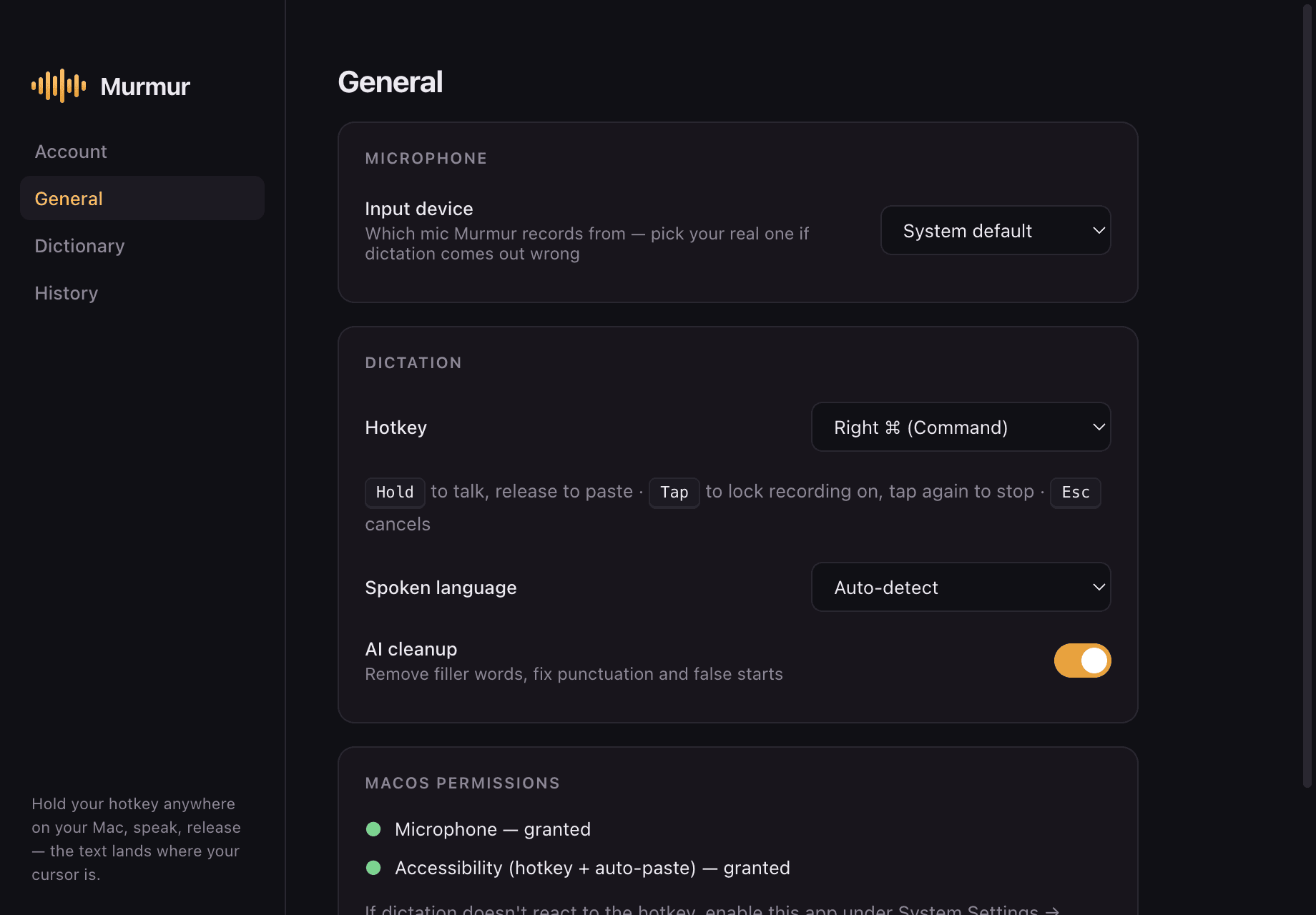
Pick your mic, choose a hotkey, flip on AI cleanup. PromptStream sits in your menu bar and stays out of the way until you hold to talk.
How it works
Hold the key
Hold Right ⌘ (Right Super on Linux) — or remap it to any key or shortcut you like. A small pill appears with a live waveform, so you know it's listening.
Say it like you'd say it
Ums, false starts, changing your mind mid-sentence — all fine. Speak naturally; PromptStream handles the mess.
Release. It's typed.
About a second later, clean text is pasted right where your cursor is — Slack, Gmail, Notion, VS Code, anywhere.
Long dictation? Tap the hotkey instead of holding to lock recording on. Esc cancels anytime.
Everything you need. Nothing you don't.
Cleanup that respects you
Filler words, false starts, and self-corrections disappear. Punctuation and capitalization are fixed. Your meaning and tone are never rewritten.
Works in every app
The text lands wherever your cursor is — Slack, Gmail, Notion, VS Code, iMessage, your terminal. No copy-paste dance, no switching windows.
Fast, and it never loses your words
Powered by Groq inference — transcription typically returns in ~1 second. And if anything goes wrong mid-flight, your raw words are kept in history and on your clipboard. Dictation never fails silently.
13 languages, auto-detected
English, French, Arabic, German, Spanish, Italian, Portuguese, Dutch, Turkish, Hindi, Japanese, Korean, and Chinese. If typing in English is slower than speaking it, PromptStream closes the gap.
Personal dictionary
Teach PromptStream the names, brands, and jargon it must get right. Once learned, always spelled correctly.
Searchable history
Everything you dictate is saved locally and searchable, with one-click copy. It never leaves your machine.
Your setup, your rules
Pick your microphone, remap the hotkey to any key, and watch the live waveform confirm every word is being heard.
Easy on your wrists
If typing hurts — RSI, wrist pain, long days at the keyboard — dictation is real relief. Write your emails, messages, and docs without touching the keys.
Quiet about your words, too.
Start in 30 seconds
A free account and you're dictating — no credit card, no API keys, nothing to configure.
History stays on your machine
Your dictation history is stored locally. We can't read it; nobody else can either.
Audio is never stored
Your audio is processed transiently for transcription and immediately discarded. It's never saved, anywhere.
Simple pricing
Monthly
- ✓Unlimited dictation
- ✓AI cleanup on every transcript
- ✓Personal dictionary and local history
- ✓Priority support
Yearly
Save 30%Works out to under $5 a month
- ✓Unlimited dictation
- ✓AI cleanup on every transcript
- ✓Personal dictionary and local history
- ✓Priority support
Wispr Flow is $15/mo. superwhisper is $8.49/mo. PromptStream is $7 — and $59 a year works out to under $5 a month.
Questions
Does PromptStream need an internet connection?
Yes. Your audio is sent for transcription, processed transiently, and never stored. Transcription typically returns in about a second.
Which platforms does it run on?
macOS 13 or later (Apple Silicon and Intel), and Linux x64 via AppImage — Fedora, Ubuntu, and most other distros. Windows is not supported yet.
Can I change the hotkey?
Yes. Right ⌘ is just the default — set any key or shortcut you like. Hold it to dictate, tap it to lock recording on, Esc to cancel.
Where does my audio go?
Audio is processed transiently for transcription and immediately discarded — it is never stored. Your dictation history stays on your machine.
Does it work in every app?
Yes — anywhere you can place a text cursor. Slack, Gmail, Notion, VS Code, iMessage, your terminal, form fields in your browser.
Is there a free plan?
Yes — 20,000 words a week, free forever, with nothing to configure. Need more? Pro is $7/month or $59/year for unlimited dictation.
Is PromptStream a Wispr Flow alternative?
Yes — at less than half the price. PromptStream Pro is $7/month vs. Wispr Flow’s $15, or $59/year vs. their $144. Same hold-a-key, speak-anywhere experience.
Which languages are supported?
13 languages with auto-detect: English, French, Arabic, German, Spanish, Italian, Portuguese, Dutch, Turkish, Hindi, Japanese, Korean, and Chinese.
What about Windows?
Windows support is coming, but is not built yet. Email support@promptstream.app and we’ll tell you the moment it ships.
Say it once. It's typed.
Free plan included — dictating within a minute of downloading.
macOS 13+ · Apple Silicon & Intel · Linux AppImage (x64)